
When a Windows implant makes the rounds, your first reflex is probably right for last year’s mess: look for encryption, hunt loud beacons, and roll the firewall for brute-force noise. That reflex will miss TASK#STOMP. Securonix Threat Research pulled apart a backdoor that treats your document workflow as the prize. It searches drives for business files, ships them to attacker infrastructure, then stays resident so every new or edited document becomes another upload. If your cybersecurity program still grades the week by “no ransom note,” this family is built to look like a quiet Tuesday.
It clocks in after you hit Save
Ransomware is theatrical. TASK#STOMP does inventory. Akshay Gaikwad and Aaron Beardslee of Securonix built their write-up from one infected machine, which means you do not get a victim census, a campaign size, or a tidy industry list. You get a behavior. Treat that behavior as the story.
The implant hunts business documents across local drives, then ships what it likes. After the first pass, it remains. A new contract. A revised forecast. A deck someone renamed at 4:50 p.m. Each save is another chance to upload. Teams that only image a host after a “suspicious executable” alert will miss a week of drafts that never sat still long enough to look like a stash.
Operators can send commands too. The document loop pays the bills. The shell keeps the host useful when a file server, a VPN path, or a cloud sync client looks juicier than the laptop disk. You should assume the first machine is a mailbox, not the archive.
You already allow this traffic pattern. Users copy files. Browsers upload. Backup agents run. If your only high-severity signature is encryption of the whole volume, a selective, patient copy job will never qualify as an incident. It will qualify as work.
Stolen Wi-Fi passwords are a floor plan
Saved wireless profiles turn one endpoint into a map of every network that laptop ever loved. Corporate SSID. Guest. A lab VLAN someone joined “just for a printer.” A home mesh that still uses a passphrase from 2019. TASK#STOMP collects those leftovers. Rotate the obvious office key and you have still left the lab and the vendor portal sitting in Windows like a sticky note.
Clipboard text is worse because your people think it is ephemeral. One-time codes. A password they refused to store in the manager. A customer ID yanked from a ticket. The backdoor reads that stream. You will not find it in the shared-drive review that legal asked for after the fact.
Screenshots close the cases that never became files
Anything that lived only on a monitor is in play: MFA QR codes, chat sidebars, banking tabs, the admin console someone “just needed to check.” Pair that with arbitrary commands and your incident response starts on a host that already photographed itself. Defense in depth that stops at the perimeter never sees that loop. The camera is the user session.
If wireless is listed in your cyber security standard as “just connectivity,” this family would like a word. A stolen PSK is lateral movement you handed over in a convenience feature. The laptop was the scout.
Your cybersecurity stack still rewards a quiet week
Most threat detection programs still organize around embarrassment. Encryption is embarrassing. A public C2 domain is embarrassing. A PDF leaving over HTTPS looks like a support ticket. TASK#STOMP is counting on that grading rubric.
Your tools can report a healthy posture while Explorer, Office, or a helper process reads the Documents folder and posts files outbound. Threat-protection catalogs that obsess over packers and known loaders will shrug at file-open loops that resemble a person working. Security hardening checklists that stop at patch level and SmartScreen never ask which processes may enumerate *.xlsx and then use the network.
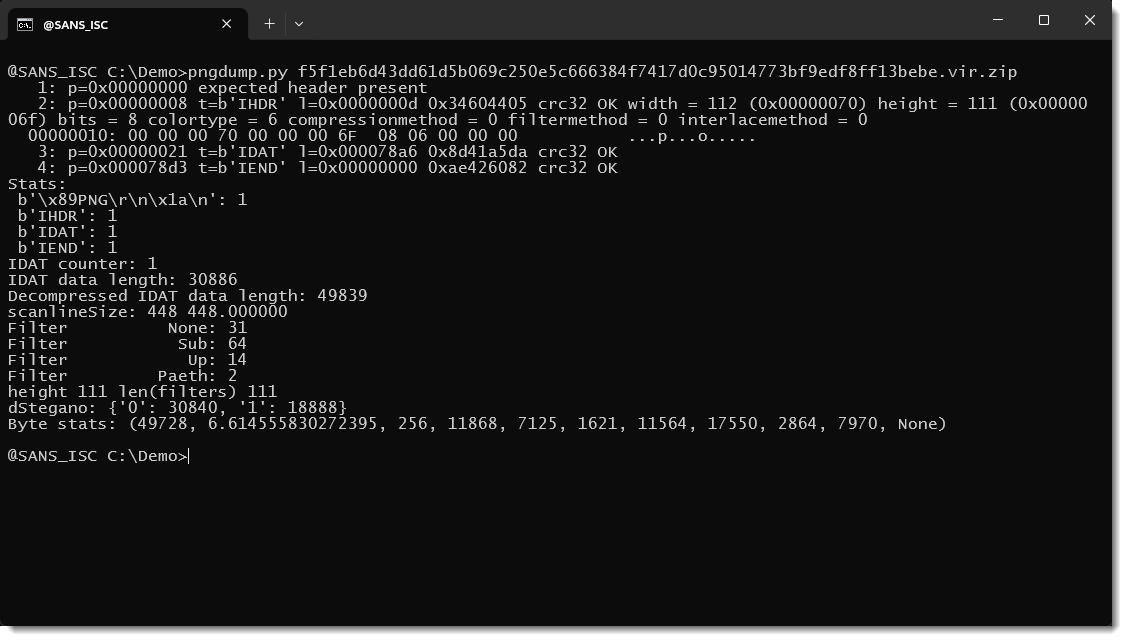
Quiet delivery has the same shape. SANS ISC walked through TerminalFix, a multistage campaign Microsoft tied to a reverse tunnel, and focused on PNG files that hid content with steganography. Users open pictures all day. If your content inspection treats PNG as decoration, you built a bypass into the allowlist. The image is the wrapper. The tunnel is the sequel. A document watcher is what a quiet wrapper can buy you once the host is yours: a live feed of work product instead of a one-time smash.
The real problem here is incentive design. Analysts get praised for catching the noisy loader. Nobody gets a trophy for asking why WinWord talked to a fresh cloud prefix after a save. Until that question is cheap and routine, patient implants will keep looking like productivity.
Hunt the save, not the scream
You do not need a branded gadget to deal with a document watcher. You need owners, logs, and the nerve to collect before you reimage. Do the immediate work on the box in front of you, then change the controls that made the box a library.
Start here when a host looks like a live document implant:
- Isolate the endpoint and capture memory plus the user profile before anyone “cleans it up.” You want evidence of document-path enumeration, screenshot writes, clipboard access, and unexpected children of Explorer or Office.
- Treat every saved wireless profile as spilled. Rotate those PSKs, check guest and lab SSIDs, and look for the same laptop joining networks it had no business storing. A stolen office passphrase is a campus problem, not a laptop problem.
- List outbound connections from document, browser, and sync processes to destinations that are not your known backup or collaboration tenants. A first-time prefix after a save is more interesting than another failed SSH guess at the edge.
- Search the rest of the user population for the same persistence, the same unusual child processes, and the same file-to-network pairing. One machine is the sample Securonix had. Your job is to prove it is not a pattern.
Ongoing work is dull and it is the part that actually reduces risk. Instrument process-to-network telemetry for Office, PDF readers, and Explorer. Alert when those processes post to rare destinations after a burst of file reads. Cut saved wireless on corporate builds that do not need it. Put DLP or egress controls on the document paths your finance and legal teams actually use, not the ones on the architecture slide. Tabletop an incident where nothing encrypts and files still leave; if your playbook only starts at “ransom note on the desktop,” rewrite it.
That is security hardening with a narrower target: the save event. Defense in depth that never inspects the document plane is a stack of products watching the wrong door.
Frequently Asked Questions
- How would we even know TASK#STOMP was here?
- You probably will not get a product-name popup. Hunt for persistence plus document enumeration, screenshot or clipboard access, and outbound file movement from user processes. Pair host artifacts with rare destinations after save bursts, then compare that pattern across the fleet.
- Why act on an analysis from a single machine?
- Securonix cannot tell you how many organizations are hit, and you should not invent a victim count. The value is the playbook: a backdoor that waits for new files, steals wireless leftovers, and accepts operator commands. That design works anywhere Windows users draft real work locally.
- Should we just block PNG files after TerminalFix?
- A blanket PNG ban will last until the first marketing deck needs a screenshot. Prefer inspection, sandboxing, and process allowlists for what may decode images and then launch follow-on code. Pair that with the TASK#STOMP lesson: control what happens after the file is trusted, not only which extension arrived.
Sources
- The TASK#STOMP Windows backdoor takes Wi-Fi passwords, screenshots, and business files
- TerminalFix: PNG Steganography
Take Control of Your Server Security
Don't let brute-force attacks slow you down. Try IPBan Pro risk-free for 30 days.
Secure. Automated. Lightweight.

Take Control of Your Server Security
Don't let brute-force attacks slow you down. Try IPBan Pro risk-free for 30 days.
Secure. Automated. Lightweight.