
Most security programs still treat social engineering as an inbox problem. You bought the gateway, you tuned impersonation rules, and you trained people to hover over links. That stack can be working exactly as designed and still miss the campaign sitting in front of you. Unit 42’s Spring Ring reporting shows operators abusing Microsoft Teams and voice phishing to deploy malware and aim at enterprise domain controllers. A cybersecurity plan that maps every “user trickery” event to email has a blind spot the size of a headset, and it sits inside a client you already allowed through the firewall.
Teams Already Finished the Attacker’s Introduction
Stop picturing a random phone call from a spoofed number. Picture a toast in the same window where project channels live. The display name looks like IT. The call is about MFA, a lockout, or a “security check” the user has been told to take seriously. They’re already signed into the corporate tenant. The hard part of the con, getting someone to believe the contact is internal, happened when Teams painted the thread.
You don’t need a novel exploit for what Unit 42 is describing. You need a human who will follow a helpful voice, a help-desk culture that solves problems on live calls, and a directory that still lets a single workstation become a launch pad. Plenty of enterprises have all three. Spring Ring uses Microsoft Teams and voice phishing to deploy malware, then goes looking for the domain controllers that make the rest of the network obey. The chat is the delivery. The directory is the prize.

This is a bad look for anyone who briefed the board that collaboration sits “inside the perimeter.” Teams is a switchboard with file transfer, voice, and a long habit of talking to guests. If external access and federation are still on from the first rollout, you imported the public internet’s caller-ID problem into the one place users least expect a con. Users trust that green presence dot. Attackers only need that trust to last for one callback.
Your Inbox Metrics Will Look Fine While This Lands
Look at the Guildma (Astaroth) notes out of SANS this week if you want the contrast. Handlers are still picking apart Brazilian Portuguese email that tries to infect people the old way: lure, click or attachment, loader. That path still works on the hurried and the unpatched. It’s also the path your threat-protection spend is built around. Spring Ring doesn’t pick a fight with that stack. It walks around it.
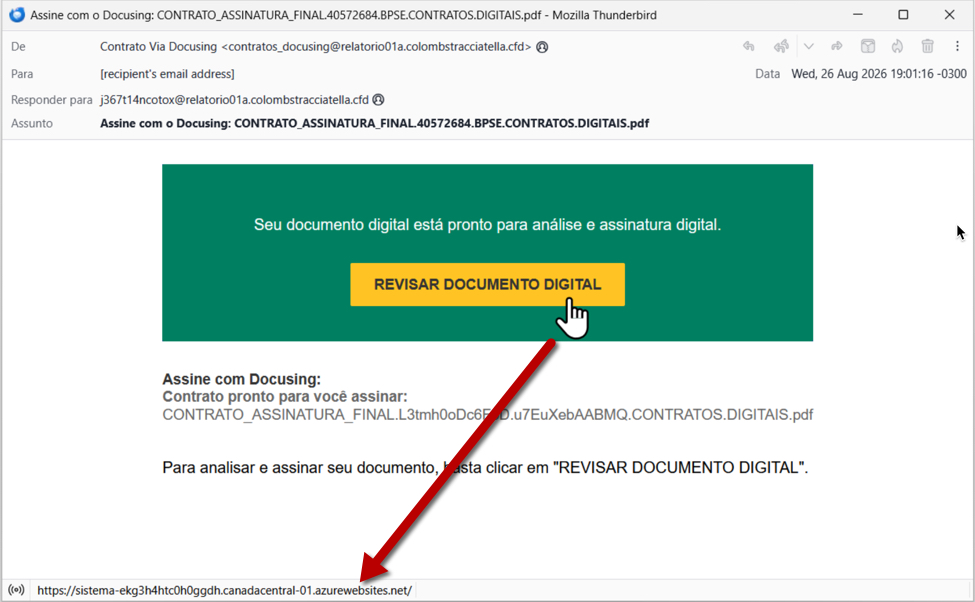
Quiet mail queues during a Teams-vishing wave will fool people. SOC dashboards that treat “phish caught” as the health metric will look green while a service-desk impersonator talks a finance laptop into running a payload. Threat detection that only parses headers and rewritten URLs will have nothing to parse. You asked the wrong sensor for an answer, then used the silence as comfort.
Network owners make this easier when they treat Teams as sanctioned SaaS and stop looking. Media ports open. Guest access lingers. Federation defaults nobody has reviewed since 2021 still let strangers start a 1:1. Defense in depth that is edge firewall plus mailbox plus laptop agent has a hole shaped like a voice packet to a cloud relay you allowlisted on purpose. If your cyber security budget is 80 percent email and endpoint, the chat control plane is underfunded, and Spring Ring is counting on that mix.
Cybersecurity Has to Follow the Call Into the Directory
You can’t patch users out of answering a coworker-looking call. You can make the call expensive, the payload loud, and the directory intolerant of one workstation suddenly acting like an admin console. Security hardening here is tenant configuration, identity tiering, and rehearsal. Another awareness poster will not move this risk.
Do this before the next callback lands
- Lock who can message and call your users from outside the tenant. External access and federation are the vishing on-ramp. If the business truly needs external chat, allowlist partner domains, kill unmanaged guest sprawl, and log external 1:1 chats and calls the way you log inbound mail from new senders. An “allow all” leftover from deployment is the hole.
- Split “IT called me” from “IT is allowed to change my credentials.” Voice plus a Teams window is not enough for password resets, MFA device adds, or privileged unlocks. The user, or the real desk, must open a ticket they created or call back a number from the HR directory, not a number pasted in chat. Train the service desk too. They’re the ones being impersonated, and a desk that “just helps” on live calls is part of the attack path.
- Treat a workstation that took a “support” call as hostile until your own telemetry says otherwise. Isolate it. Collect it. Look for new local admins, services, Run keys, stolen browser sessions, and unexpected outbound beacons. Incident response for this pattern starts on the endpoint. Opening the email console first will burn the hour you still have.
- Assume Spring Ring’s interest in domain controllers applies to yours. Privileged logons only from admin workstations. Alert on replication changes, GPO edits, ntdsutil-style access, and new members in privileged groups. A chat compromise is recoverable. A directory compromise is the company. Put those alerts on a path that pages a human, not a report someone reads on Monday.
- After a foothold, watch for brute-force and password spray against RDP, VPN, and LDAP from internal addresses. Automatic blocks on repeated failures (ipban-style controls on Windows jump hosts) stop the noisy second stage while you hunt. If you already run IPBan Pro on those boxes, fold those events into the same ticket as the Teams call. Don’t let a follow-on spray get filed as unrelated noise.
Keep going after the first week. Review Teams federation the way you review firewall rules: quarterly, with an owner, and with a written exception for every external domain. Add threat detection that flags new external 1:1s to executives, help-desk impersonation language in chat, and process ancestry on endpoints where a collaboration client spawned a scripting host or unexpected installer. Tabletop a vishing-to-DC scenario until the service desk, the SOC, and identity ops can say who isolates the laptop, who disables the user, and who checks privileged groups without a 40-minute argument.
None of that requires a particular vendor’s Teams add-on. It requires you to treat the collaboration tenant as privileged infrastructure, the same way you already claim to treat VPN concentrators and jump hosts. If a stranger can ring your users in the corporate client, you extended the perimeter and forgot to staff it.
Frequently Asked Questions
- Will a stronger email filter stop Spring Ring?
- No. The campaign Unit 42 documented rides Teams and voice, so mailbox scanning never sees the lure. Put the effort on tenant access policies, out-of-band verification for credential changes, and endpoint plus Active Directory telemetry that still works when the inbox is quiet.
- Should we disable all external Teams access?
- If the business can live with it, that’s the cleanest control you have. If it can’t, allowlist partner domains, disable unmanaged guests, and review federation on a schedule with a named owner. An open federation setting from the original rollout is still an open door.
- How is this different from ordinary phone vishing?
- The trust signal is stronger because it appears inside a corporate app, next to real channels and real colleagues. Callers don’t have to survive the “unknown number” heuristic. Your users already decided Teams is work, and Spring Ring is using that decision to aim at the directory.
Sources
- Spring Ring: An Inside Look at Voice Phishing Campaigns in Microsoft Teams
- Guildma (Astaroth) malware infection from Brazilian Portuguese email
Take Control of Your Server Security
Don't let brute-force attacks slow you down. Try IPBan Pro risk-free for 30 days.
Secure. Automated. Lightweight.

Take Control of Your Server Security
Don't let brute-force attacks slow you down. Try IPBan Pro risk-free for 30 days.
Secure. Automated. Lightweight.