
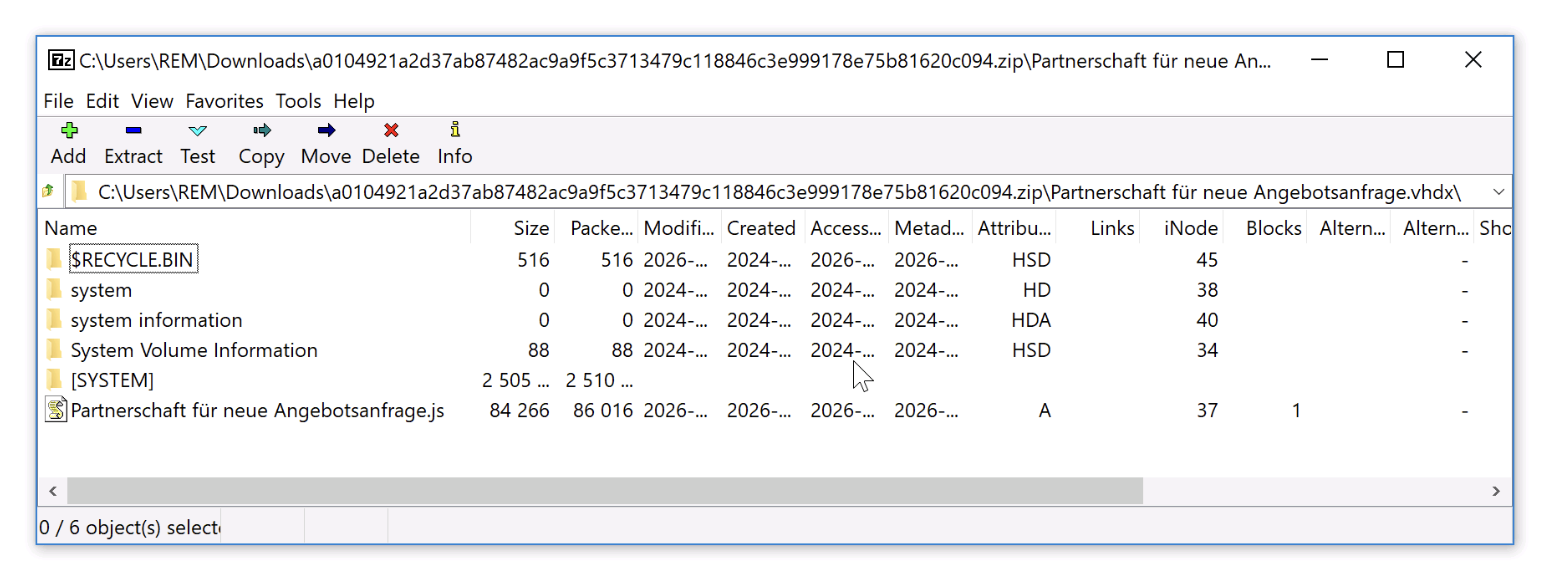
A reader at the SANS Internet Storm Center forwarded a malicious ZIP archive on June 16. Nothing unusual about that. What was inside, though, is worth your attention: a single VHDX file. Mount it (which modern Windows does automatically on double-click), and a JavaScript loader fires up, fetches Remcos RAT, and your endpoint just inherited a remote control problem. The whole chain bypassed traditional email and archive scanners because almost nothing in the cybersecurity stack inspects what’s inside a virtual hard disk.
This isn’t a one-off. Look at the rest of the week’s threat reporting and a pattern jumps out. Attackers have stopped trying to break filters and started picking delivery vehicles that filters were never built to inspect. Steam Workshop wallpapers. Fake Microsoft account alerts. Virtual disk images. The common thread is borrowed trust, and your defenses are still calibrated for last decade’s payloads.
Why The VHDX Trick Works So Well
A VHDX is a virtual hard disk format. Windows treats it as legitimate storage media, mounts it like an inserted USB drive, and assigns it a drive letter. There’s no warning prompt. There’s no SmartScreen check on the payload inside. Mark-of-the-Web tagging, which usually flags files downloaded from the internet, doesn’t propagate to files inside the mounted volume. That last detail is the whole game. The JavaScript dropper looks, to the operating system, like it was already on a local disk.
Email security gateways scan the ZIP. Some scan one level deep into the VHDX if they’re feeling ambitious. Most don’t. EDR tools see a mount operation, a script interpreter spinning up, and a download. By the time the behavioral threat detection model decides the chain is suspicious, Remcos is already calling home from a fresh Windows process tree.
The Genians Security Center reported a parallel campaign this week from ScarCruft, the North Korean group, impersonating Microsoft account security alerts to drop NarwhalRAT. Same trick, different wrapper. The lure tells you your account is at risk. The “fix” is a malicious attachment. Once the user clicks, the malware lands inside a process that looks like Office or a browser, both of which your allowlist already trusts.
Steam, Sentry, And Other Channels Defenders Don’t Watch
Kaspersky’s Securelist team documented dozens of malicious wallpapers hosted on Steam Workshop targeting gamers in China and Russia. Steam is a trusted brand running on a trusted port. Workshop content is user-generated, which means anti-malware vendors can’t easily block it without breaking the platform’s whole reason for existing. Malwarebytes’ investigation into the EtherRAT infrastructure tells the same story from a different angle: an enormous web of malicious sites pushing remote-desktop software, phishing pages, and laced documents, all dressed up to look like legitimate tools your help desk would install themselves.
If you’re running corporate endpoints, you probably feel insulated from a Steam Workshop campaign. You shouldn’t. The mechanism is what matters, and the mechanism is showing up everywhere. Earlier this month, attackers were weaponizing fake Sentry error reports to feed instructions to AI coding agents. The disk-image and wallpaper campaigns are the same idea aimed at humans: deliver malicious content through a channel that the recipient, and the recipient’s security tooling, has already decided is safe.
The Cyber Security Stack You Need For This
Vendor-neutral, immediate steps. Do these this week.
Start with file-type policy. Treat ISO, IMG, VHD, and VHDX as executables in your email gateway and your endpoint policy. Block them from external senders by default. If a finance team genuinely needs to receive disk images, route those exceptions through a quarantine and unpacking workflow instead of a generic allow rule. The same rule applies to LNK, MSI, and OneNote files, which have been abused in similar ways. Your firewall and gateway will not save you here. The control has to live on the endpoint.
Next, take a hard look at what auto-mounts on user workstations. Windows lets you disable Explorer’s automatic mounting of virtual disks for standard users through Group Policy or Intune, and you should. Standard users should not be mounting block devices, full stop. That single change kills the VHDX delivery technique at the operating system level without breaking anything legitimate.
For ongoing security hardening, treat content channels the way you treat email. That means inspecting traffic to gaming platforms, code-hosting sites, and collaboration tools the same way you inspect SMTP. It means logging child-process creation from script interpreters (wscript, cscript, powershell) and routing those into your threat-protection pipeline with a tight retention window so an analyst can reconstruct the chain. Defense in depth doesn’t mean buying more boxes. It means assuming the first three layers will miss the disk image and giving layer four something useful to see.
Identity matters too. Most of these campaigns end with a credential prompt or a token theft attempt. Phishing-resistant MFA, short session lifetimes, and brute-force controls on any externally reachable login keep the blast radius small when one user does fall for a fake Microsoft alert. Pair that with a working incident response playbook for valid-credential intrusions, because the malware’s whole job is to convert one click into one set of working logins.
Frequently Asked Questions
- Why don’t antivirus engines just scan inside VHDX files?
- Some do. Most don’t scan deeply, because virtual disks can be huge and the formats supported (VHD, VHDX, ISO, IMG, dmg, qcow2) are a moving target. Scanning every mounted volume in full would crater performance, so vendors typically rely on behavioral detection after the mount happens, which is exactly the window attackers are exploiting.
- Should we block ISO and VHDX outright at the email gateway?
- For inbound mail from external senders, yes. The legitimate use cases (sharing virtual machine images, software distribution) almost always happen through file-sharing platforms or dedicated channels, not unsolicited email attachments. The risk reduction is large and the operational cost is small.
- Does disabling AutoPlay stop these attacks?
- It helps for removable media but doesn’t fully cover double-click mounting of VHDX files from Explorer. You need both AutoPlay restrictions and a policy that prevents standard users from mounting virtual disks. Test the combination on a pilot group before rolling out.
Sources
- SANS ISC: From a VHDX File to a Remcos RAT
- The Hacker News: Fake Microsoft Alerts Used to Deploy NarwhalRAT
- Securelist: Malicious Wallpapers on Steam Workshop
- Malwarebytes: Inside the EtherRAT Infrastructure
Take Control of Your Server Security
Don't let brute-force attacks slow you down. Try IPBan Pro risk-free for 30 days.
Secure. Automated. Lightweight.

Take Control of Your Server Security
Don't let brute-force attacks slow you down. Try IPBan Pro risk-free for 30 days.
Secure. Automated. Lightweight.